SimplyGo EV Charging is a feature within the SimplyGo app that lets you conveniently find, use and pay for EV charging at charging stations across Singapore. You can access thousands of charging stations directly from the SimplyGo app – without needing to download another app.
Please refer to the step-by-step guide to find a charging station.
Tap any station to see whether it's free or in use, its charging speed (AC or DC), plug type (e.g. Type 2 or CCS2), and price.
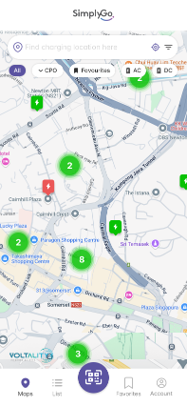
If nearby stations aren't showing, make sure location services are switched on both in your phone's settings and in the SimplyGo app's permissions, then refresh or restart the app.
No, your existing SimplyGo account is all you need to use the EV Charging feature via the SimplyGo app.
Yes. The SimplyGo EV Charging feature supports charging at participating charging points that use Type 2 or CCS2 charging port. This includes charging for all compatible electric vehicles (EVs), plug-in hybrid electric vehicles (PHEVs) and electric motorcycles in Singapore.
No, the SimplyGo EV Charging feature is only available within Singapore currently.
No, charging lots are available on a first-come, first-served basis. You can check a charger's live status via the SimplyGo app before heading down to the charging point.
Currently, Singapore-issued Visa and Mastercard credit and debit cards are accepted for SimplyGo EV Charging. Foreign-issued cards are not currently supported. More payment options will be introduced progressively.
Please refer to the step-by-step guide to add a payment method.
If your card is still rejected after verifying that your card details are correct and that you’re using a supported payment method, please contact us via our eFeedback form or call our hotline at 6883 5048 (8am - 6pm daily, closed on Public Holidays).
You can save up to six payment methods.
When you start a charging session, a pre-authorisation hold may be placed on your card to verify that sufficient funds are available to cover the session. Once the charging process is completed, you will be charged the actual amount, and any remaining hold will be released. The hold is usually released within two to seven working days, depending on your bank.
Your bank card will be charged the exact final amount of the charging session. The pre-authorisation hold does not limit the amount you can be charged, and no action is needed on your part. Your charging session will not be interrupted.
Yes. A minimum fee of $0.50 applies to each completed charging session.
If you charge… | Actual Charging Fee | Final Charging Fee | Why |
For less than 30 minutes | $0.30 | $0.50 | Minimum fee of $0.50 applies |
For 30 minutes and more | $15.50 | $15.50 | Above $0.50, so actual price applies |
Some charging stations may charge an overstay or idle fee if your EV remains plugged in after it has finished charging. This helps keep charging lots available for other drivers. A grace period (usually around 10–15 minutes) may apply before the fee starts, depending on the charging operator. The applicable grace period and fee will be shown on the charging station’s details page in the SimplyGo app.
Yes. The prices displayed are inclusive of GST, where applicable. The minimum charging fee is also inclusive of GST.
Idling fees are not subject to GST and are therefore excluded from GST charges.
Please refer to the step-by-step guide to start a charging session.
You can monitor your charging session in real time via the EV Charging feature in the SimplyGo app. You can view:
Energy received (kWh)
Charging duration
State of charge (%) (For DC Stations Only)
Please refer to the step-by-step guide to end a charging session.
Yes, the charging station will automatically stop charging once your EV indicates that the battery is fully charged. We recommend returning to your vehicle promptly after charging is complete to avoid any overstay or idling fee.
Yes. Once a charging session starts, the charging cable is electronically locked to your EV and cannot be removed until the charging session is ended via the SimplyGo app. For added security, remember to lock your EV doors before leaving.
The main difference is charging speed:
AC charging ("normal"/slow charging): Generally slower and suitable when you plan to leave your vehicle parked for a few hours, such as while working, dining, or watching a movie.
DC charging ("fast"/rapid charging): Generally much faster and suitable when you need to recharge your vehicle in a shorter time. Charging speed varies depending on your vehicle and charging station.
Try the following steps:
Unlock your EV. For some EVs, you may need to press the “Unlock” button on your key fob more than once to release the charging cable.
Check your EV’s manual to locate the physical emergency release cord, if it remains locked. This is usually located inside the trunk, near the charging port.
For emergencies: If there is an immediate safety risk, such as a vehicle or charger fire, electrical hazard, or other dangerous situation, contact the Charge Point Operator's (CPO) via its emergency hotline displayed at the charging point, or call the appropriate emergency services (999 or 995), depending on the nature of the incident.
Try the following steps:
Unplug the charging cable, wait about 30 seconds, then plug it back in firmly until it clicks into place.
Start the charging session again via the SimplyGo app.
If you are unable to stop the charging session via the SimplyGo app:
Use your EV's stop or unlock function to end the charging session. Refer to your EV's manual for instructions.
If the session cannot be stopped using the app or your vehicle’s controls, use the emergency stop function on the charging station, if available. Follow the instructions displayed on the charger.
For emergencies: If there is an immediate safety risk, such as a vehicle or charger fire, electrical hazard, or other dangerous situation, contact the Charge Point Operator's (CPO) via its emergency hotline, where available, or call the appropriate emergency services (999 or 995), depending on the nature of the incident.
A pre-authorisation hold is placed on your bank card before a charging session starts to verify that sufficient funds are available. If the pre-authorisation is unsuccessful, the charging session will not start.
Please check that your saved payment method is valid, your bank card details are correct, and your card has sufficient funds. If the issue persists, please check with your bank or try another payment method.
For your safety, the charging station will stop charging and the charging cable will be released when power is interrupted. You'll only be charged for the energy (kWh) delivered before the interruption.
Once power is restored, you can try starting the charging session again. If the charging station remains unavailable, you can move to another charging point.
Please contact us via the SimplyGo e-Feedback form or our hotline at 6883 5048 (between 8am – 6pm daily, closed on Public Holidays) for payment issues, app errors, or billing disputes.
When contacting us, please provide your vehicle number, date and time of the charging session, and the charging station used to help us investigate the issue.
You may reach out to the relevant Charge Point Operator (CPO) directly. The CPO’s contact details are available in the SimplyGo app under the details of each charging station.
You may also share it with us via the SimplyGo e-Feedback form.